Free Action to Reset Your Edit

Ever just feel like starting over with an edit? It doesn’t happen often, but it does happen. When you do feel like that, there are three ways you can do all your work: Close the image without saving it and the work you’ve done will be gone. Go to the History panel (Undo History panel […]

Action Edit using Carson City B&W

written by Beckie of beckiegkengle.com It’s been a little while since I’ve done an action edit. And I haven’t had a chance to try out the updated “City Lights” B&W set from Amanda! There were a few new actions added into that set. For this edit I chose ‘Carson City’.     The first thing […]

Free Watermarking Action for Photoshop Elements

Beckie did a wonderful post last week, showing Photoshop CS users how to make their own watermarking action. Photoshop Elements users cannot MAKE actions, but they can USE actions, so today I’m sharing a free watermarking action. To use the action, install it how you normally would (see tutorial on installing actions if you need […]

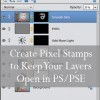
Create Pixel Stamps to Keep Your Layers

Why Layers Matter The beauty of layers (in Photoshop and PSE) is the flexibility and control they allow you to have over your image. By editing in layers, you can access and manipulate the changes made at steps you took during the edit. Eyes too bright? Go to that layer and lower the opacity. Vignette […]