I am thrilled that I Heart Faces has started their Fix It Friday back up, and this week they haven given us a beautiful photo to edit!
Below is the straight-out-of-the-camera (SOOC) image they provided.

Note: All my edits were done in Photoshop Element 9
The picture is really lovely and only had a few problems to fix: temperature (too cool), exposure (a touch too dark) and under-eye circles.
I ran Deep Clean, a cleaning action of mine that just speeds my workflow. Cleaning actions are not a “must” but they certainly can speed things up. Many action writers have them, although they approach it from different ways. Some are all in one actions like Deep Clean and some are a series of different actions to run like many of the individual actions in Everyday Essentials workflow set.
If you would like to learn how to do a clean edit on your own, read the clean edit post I wrote a while back. If you are a brand new beginner and daunted by that tutorial, this image can be improved with three simple steps:
- Brighten the image by doing a Levels adjustment, bringing in the black slider just an itty bit, then pull in the white slider to meet the edge of the histogram “mountain.”
- Warm the too-cool image by adding a warming photo filter
- Fix under-eye circles by doing a blank layer, use the eyedropper to sample skin near the under-eye circle then use the brush to brush that color on the circles. Lower the layer opacity to suit.
At the bottom of this post is a short video tutorial showing those simple steps listed above. To be clear, more was done to my final edit than just those steps.
Anyway, here is my after shot and then a before/after comparison for you.

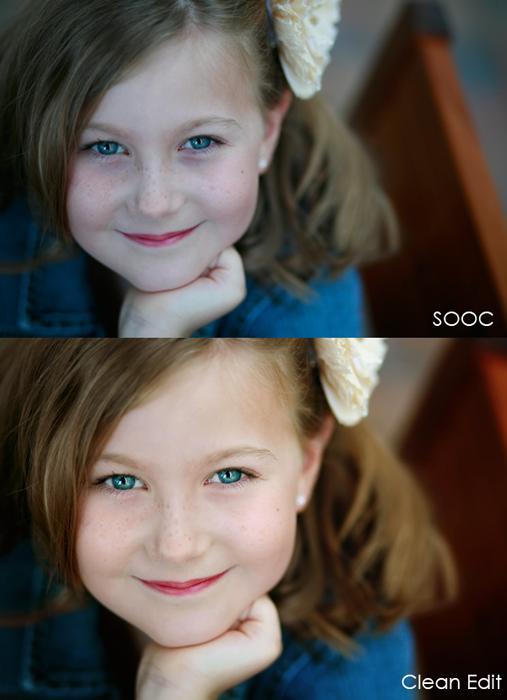
Did you participate in Fix It Friday this week? If so, leave a comment with the link to where your entry is and I will go visit!
Here is a 4 minute video tutorial showing the simple steps I shared above. If you cannot view it at the blog, click HERE.

 About Amanda





I just found your site and I’m new to PSE9. I’m glad you do Fix-it Friday too. Here’s my edit:
http://quietgracesphotography.wordpress.com/2011/01/14/fix-it-friday-82/
Amanda that looks FABULOUS!!!
Great video tutorial. I am an extreme beginning on PSE9 and I find your tips extremely helpful!
Love it! Great fix:-)
That looks beautiful! I love how the photo filter added warmth without making it too yellow/orange. It’s just right! I participated too, here’s mine:
http://twinflowerphotography.com/2011/01/fix-it-friday-san-antonio-tx-family-photographers-12/
thanks for taking the time to post your tutorial! i love how the edit turned out…and i love the color of her hair!
Wonderful edit, I love how you did the video tut too!
Love your edit, I also did an edit myself at my post: http://randyandamysfirstbaby.blogspot.com/2011/01/fix-it-friday-82.html. Also last night’s workshop was great I feel like I really get everything and it has just clicked!
Thank you for posting this tutorial for me and especially for my daughter Savannah~ she inherited by Canon and bought PSE9 for her Mac. I immediately taught her how to do a levels bump. Today I shared this tutorial with her and she now has something new to use. THANK YOU!!! Hope you have a GREAT weekend!!! and see you Sunday in class. 🙂
Plus I think I am signing up for your photog class. 🙂
Blessings and Joy!!!
Would you tell us more about how you got those eyes so bright and saturated? I use your clean edit actions and the eyes in my photos never look that good after a clean edit! What settings do you have your brushes on when you do the eye layers?
Rachel, great question. Really, I used the “Blue Eyes” layer in Deep Clean which is just a levels adjustment that tweaked the blues, greens and cyans, then inverted the layer.
Great edit…I have your deep clean action and never know when to use it! Here is my take:
http://shuttergirlphotography.blogspot.com/2011/01/fix-it-friday-i-faces.html
Thanks for this great article, Amanda. I love that you state user friendly terms, like mountain, which I use because I’m so not a technical person. I can’t wait to take your class in a couple weeks. I so want to learn layers and feel like I have a better handle on PSE!!
This turned out amazing Amanda. Absolutely gorgeous!
I didn’t know about the screen layer trick, so I learned something from your video! Thanks!
I too am a PSE user and love it, maybe I’ll upgrade to PS one day but not anytime soon because PSE allows me to do all that I need to right now.
Your edit is so pretty. Sounds trite doesn’t it but that’s exactly how I responded to it…pretty!
I love your edit. It is really lovely and clean. I also love how you explain things to others. I seem to never have the time to write it all out and delve into the basics for others….I hope to work on that this year as I learned so much from other photographers when I started out. Thanks!
Beautiful edit!! I attempted (i use that word loosely 🙂 ) and edit.
http://janicesmithphotography.com/blog/?p=296
Any CC would be MUCH appreciated. The first edit was my attempt at the DC action we learned about last night 🙂 I think the other three actions i ran are PTM and PW.
Great under eye fix!!! 🙂
Thank you so much for the tutorial. I am new to PSE and at times feel so lost!
Great tutorial. I am learning PSE9 and this HELPED ALOT!!! 😀
Great tutorial !! Im brand new to elements, still trying to get my head around it, thank you !
Beautiful edit, Amanda!
I just found your website through pinterest and I have to say it is amazing. I love photography but often become overwhelm when editing. I just watch one of your tutorials and you made it simple and enjoyable. I look forward to learning more. Thank you for sharing!
Sweet blog! I found it while surfing around on Yahoo
News. Do you have any suggestions on how to get listed in Yahoo News?
I’ve been trying for a while but I never seem to get there! Thank you
How awesome. I don’t have Photoshop but was looking into it, and I think it is something I should buy for sure!! Thanks for your how-to video, I will save this!
Thanks so much for the quick tutorial! Easy for busy moms!
Amanda, I love this simple step by step tutorial. How can I create my own presets?
The after image is gorgeous! I just wish the (very effective!) under-eye fix didn’t obscure her beautiful freckles.